
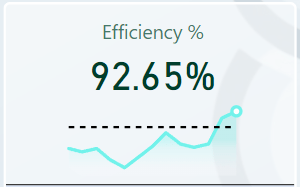
Welcome to my first post in my page. I am eager to share with you a modificated SVG template that will keep the months even if you filter dates in Power Bi. This code was extracted from Kerry Kolosko and modified by me.
Remember to replace [Month Date] with your Date parameter, ‘Calendar’ with your actual calendar table and [Efficiency %] with the desired measure.
Something no-one told me
I suffered when I tried to use SVG for the very first time. Don’t repeat my mistake and remember to set the image size to visualize it.
SVG.Efficiency % =
VAR LineColour = "#72F2EB" // Color de la línea principal
VAR PointColour = "white" // Color del último punto
VAR TargetLineColour = "black" // Color de la línea del objetivo
VAR TargetValue = 0.85 // Valor del objetivo en porcentaje

// Definición del gradiente
VAR Defs = "<defs>
    <linearGradient id='grad' x1='0' y1='25' x2='0' y2='50' gradientUnits='userSpaceOnUse'>
        <stop stop-color='#72F2EB' offset='0' />
        <stop stop-color='#BFF9F6' offset='0.3' />
        <stop stop-color='#F6F9FC' offset='1' />
    </linearGradient>
</defs>"

// Calcular rango de fechas en el eje X
VAR XMaxDate = MAXX('Calendar', [Month Date])
VAR XMinDate = MINX(FILTER(ALL(Calendar[Month Date]), Calendar[Month Date] >= Edate(XMaxDate,-12) ), [Month Date])

// Obtener los valores mínimos y máximos del eje Y
VAR YMinValue =
    MINX(
        ADDCOLUMNS(
            FILTER(
                ALL(Calendar[Month Date]),
                Calendar[Month Date] >= XMinDate && Calendar[Month Date] <= XMaxDate
            ),
            "RPH",
            CALCULATE([Efficiency %], ALL(Calendar[Date]))
        ),
        [RPH]
    )
VAR YMaxValue =
    MAXX(
        ADDCOLUMNS(
            FILTER(
                ALL(Calendar[Month Date]),
                Calendar[Month Date] >= XMinDate && Calendar[Month Date] <= XMaxDate
            ),
            "RPH",
            CALCULATE([Efficiency %], ALL(Calendar[Date]))
        ),
        [RPH]
    )

// Calcular la posición de la línea del objetivo
VAR TargetY = 50 - INT(50 * DIVIDE(TargetValue - YMinValue, YMaxValue - YMinValue))

// Construir tabla de puntos del gráfico
VAR SparklineTable = ADDCOLUMNS(
    FILTER(ALL(Calendar[Month Date]), Calendar[Month Date] >= XMinDate && Calendar[Month Date] <= XMaxDate),
    "X", INT(150 * DIVIDE(Calendar[Month Date] - XMinDate, XMaxDate - XMinDate)),
    "Y", INT(50 * DIVIDE(CALCULATE([Efficiency %], ALL(Calendar[Date])) - YMinValue, YMaxValue - YMinValue))
)

// Concatenar puntos del gráfico
VAR Lines = CONCATENATEX(SparklineTable, [X] & "," & 50 - [Y], " ", Calendar[Month Date])

// Últimos puntos en la línea
VAR LastSparkYValue = MAXX(FILTER(SparklineTable, Calendar[Month Date] = XMaxDate), [Y])
VAR LastSparkXValue = MAXX(FILTER(SparklineTable, Calendar[Month Date] = XMaxDate), [X])

// Construir el SVG con la línea del objetivo
VAR SVGImageURL =
    "data:image/svg+xml;utf8," &
    "<svg xmlns='http://www.w3.org/2000/svg' x='0px' y='0px' viewBox='-7 -7 164 64'>" & Defs &
    --- Gradiente ---
    "<polyline fill='url(#grad)' fill-opacity='0.3' stroke='transparent'
        stroke-width='0' points='0 50 " & Lines & " 150 150 Z' />" &
    --- Línea principal ---
    "<polyline
        fill='transparent' stroke='" & LineColour & "'
        stroke-linecap='round' stroke-linejoin='round'
        stroke-width='3' points='" & Lines & "' />" &
    --- Último punto ---
    "<circle cx='" & LastSparkXValue & "' cy='" & 50 - LastSparkYValue & "' r='4' stroke='" & LineColour & "' stroke-width='3' fill='" & PointColour & "' />" &
    --- Línea del objetivo ---
    "<line x1='0' y1='" & TargetY & "' x2='150' y2='" & TargetY & "' stroke='" & TargetLineColour & "' stroke-width='2' stroke-dasharray='5,5' />" &
    "</svg>"

RETURN SVGImageURL
 Jaralytics